Demystifying Python Packaging: Build Systems Explained
Explore Python’s modern build system architecture, focusing on how tools like pip, setuptools, poetry, and pyproject.toml collaborate to create reliable, reproducible, and maintainable package builds and installations.
Additional info on frontend, backend and , build interfaces
- What is a Python Build System?
- When Do You Need a Build System?
- Core Concepts and Tools
- pyproject.toml (central config file)
- Build Backends – The Engine
- Build Frontends – The Driver
- Under the Hood – Flow
- Types of Distributions
- Legacy vs Modern (Transition)
- Do You Always Need a Build System?
- Caution When Using
uvto Create Virtual Environments - Your Role as Developer
What is a Python Build System?
The Python build system refers to the process and tooling used to:
- Turn your source code (Python files, metadata, dependencies)
- Into a distributable package (e.g., a
.whl,.tar.gz) - That can be installed via tools like pip, uploaded to PyPI, or distributed internally.
This is especially important when you’re building libraries, frameworks, plugins, or CLI tools meant for others (or for deployment).
When Do You Need a Build System?
✅ You need a build system when:
- You want to distribute your Python project (PyPI or private index)
- You want to install your own code as a package in virtual environments (
pip install .) - You need to manage dependencies and metadata clearly and correctly
- You’re working in a multi-package repo or using plugins/extensions
- You’re producing binary wheels or C-extensions
❌ You don’t need one when:
- Writing simple scripts or one-off apps
- You’re the only user, not packaging or installing
- You just clone and run
.pyfiles
Core Concepts and Tools
- pyproject.toml ( central config file)
Introduced in PEP 518, it’s the modern standard.- Specifies build system, dependencies, metadata
- Replaces
setup.py,setup.cfg, andMANIFEST.inin modern workflows
1
2
3
4
5
6
7
8
9
10
 [build-system]
 requires = ["setuptools>=42", "wheel"]
 build-backend = "setuptools.build_meta"

 [project]
 name = "my-sample-project"
 version = "0.1.0"
 description = "A simple example project"
 requires-python = ">=3.7"
 dependencies = ["requests>=2.25.1"]
- Build Backends – The Engine Backends do the actual building (convert code →
.whl,.tar.gz). Popular backends:- setuptools → most common and battle-tested
- flit → minimalist, fast for pure Python
- poetry → full-featured, with dependency management
- hatch → modern and flexible
- Custom backends → for advanced use cases
They implementbuild_wheel()andbuild_sdist()functions.
- Build Frontends – The Driver These are tools you use to trigger builds:
pip install .→ builds + installspython -m build→ builds.whland.tar.gzhatch build,flit build,poetry build
Frontends:- Read
pyproject.toml - Install the backend
- Call its hooks to generate packages
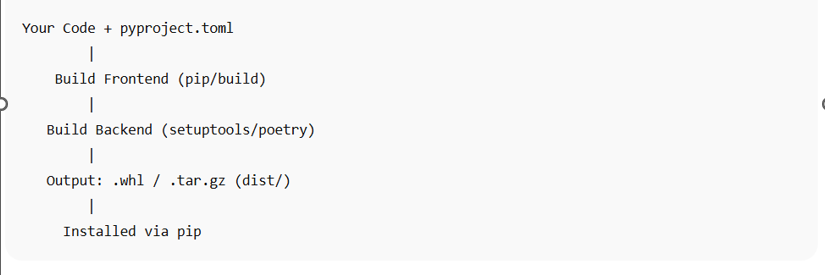
Under the Hood – Flow
Step-by-step when running pip install . or python -m build:
- Read
pyproject.toml - Install build backend (e.g., setuptools)
- Call:
build_wheel()→.whlbuild_sdist()→.tar.gz
- Backend creates files in
dist/ - If installing, pip installs from the
.whl
Types of Distributions
- Source Distribution (sdist) →
.tar.gz- Contains raw source
- Editable, flexible
- Built Distribution (wheel) →
.whl- Pre-built
- Faster installs
Legacy vs Modern (Transition)
| Feature | Legacy | Modern (PEP 517/518+) |
|---|---|---|
| Config file | setup.py, setup.cfg | pyproject.toml |
| Build backend | Implicit (setuptools) | Explicit (e.g., flit, poetry) |
| Editable installs | setup.py develop | pip install -e . (PEP 660) |
| Extensibility | Manual | Plugin-based, flexible |
Do You Always Need a Build System?
No, for:
- Scripting
- Internal utilities
- Experiments
Yes, for:
- Distributing packages
- CLI tools/plugins
- PyPI publishing
- Reproducible builds
⚠️ Caution When Using uv to Create Virtual Environments
If you use uv to create your virtual environment, do not use pip directly, because the system pip will be used instead of the environment’s pip.
If you want to use pip directly, create the environment with:
1
python -m venv .venv
Then both pip and uv will work correctly inside the virtual environment.
Your Role as Developer
You are responsible for:
- Writing Python package code (commonly in a
src/directory). - Creating and editing
pyproject.tomlto define:- Project metadata (name, version, etc.)
- Dependencies
- Build system (backend)
- Managing project environments and builds via tools like:
uvpippython -m build
- Triggering builds and installations using:
pip installuv pip installuv adduv syncuv build
You can also use uv init to initialize environments and projects.