The File Is Not Its Name: Inodes, Links and File Descriptors
Why deleting a 5 GB log doesn't free your disk: the name, the inode and the file descriptor are three different things. Hard links vs symlinks, reading ls -l properly, /proc, open fds, and how logrotate solves the whole mess — every claim run and shown.
Here’s a classic on-call moment. The disk is full. You find the culprit — a 5 GB application log — and delete it. Then you run df… and the disk is still full. The file is gone, ls can’t see it, and the space never came back.
That mystery is solvable with exactly three ideas, and they happen to be the three ideas that explain half of Linux: a file’s name is not the file, a file’s descriptor is not its name, and processes hold on to what they’ve opened. Let’s build them in order — every output below is from actually running it.
What we’ll cover
The file is not its name
When you create a file, Linux stores two separate things:
- the inode — a numbered record holding the file’s metadata (size, owner, permissions, timestamps) and pointers to the actual data blocks on disk;
- a directory entry — the name, which is nothing more than a label pointing at that inode number.
1
2
"report.txt"  ──►  inode 286784  ──►  [data blocks on disk]
   (a name)        (the real file)
The inode doesn’t know its own name. It doesn’t contain the content either — it points to the content. ls -i shows the inode number, and stat shows the whole record:
1
2
$ stat -c 'inode=%i links=%h size=%s perms=%A owner=%U' report.txt
inode=286784 links=1 size=6 perms=-rw-r--r-- owner=abhishek
links=1 — exactly one name points at this inode so far. Let’s change that.
Two kinds of links
If a name is just a label on an inode, nothing stops two names pointing at the same inode. That’s a hard link:
1
2
3
4
5
6
7
$ echo "hello" > report.txt
$ ln  report.txt copy_name       # hard link
$ ln -s report.txt shortcut      # symbolic link
$ ls -li
286784 -rw-r--r-- 2 abhishek abhishek  6 Nov 11 04:41 copy_name
286784 -rw-r--r-- 2 abhishek abhishek  6 Nov 11 04:41 report.txt
286785 lrwxrwxrwx 1 abhishek abhishek 10 Nov 11 04:41 shortcut -> report.txt
Look at the first column. report.txt and copy_name share inode 286784 — they are the same file wearing two name tags, and the 2 after the permissions counts exactly that. The symbolic link is different: it got its own inode (286785), because a symlink is a tiny real file whose content is just a path, a signpost pointing at a name.
Now delete the original:
1
2
3
4
5
$ rm report.txt
$ cat copy_name
hello                                     # fine — the inode still has one name left
$ cat shortcut
cat: shortcut: No such file or directory  # the signpost points at nothing
rm doesn’t delete files. It deletes names (the syscall is literally called unlink). The inode and its data are only reclaimed when the link count drops to zero — the hard link kept it alive, while the symlink dangled because the name it stored stopped existing.
Hard link: another name on the same inode — survives deletion of the original. Symlink: a separate little file storing a path — breaks when the path dies, but can cross filesystems and point at directories.
Reading ls -l properly, at last
With inodes and link counts in hand, every column of ls -l finally means something:
1
2
3
4
5
6
7
-  rw-  r--  r--   2   abhishek  abhishek   6   Nov 11 04:41   copy_name
│   │    │    │    │       │         │      │        │
│  user group others│    owner     group  size   modified
│   (r read, w write,└─ hard-link count (names on this inode)
│    x execute)
└─ type:  -  regular    d  directory   l  symlink
          c  char device (terminal)    b  block device (disk)
The same anatomy from an old slide in my notes, in colour:
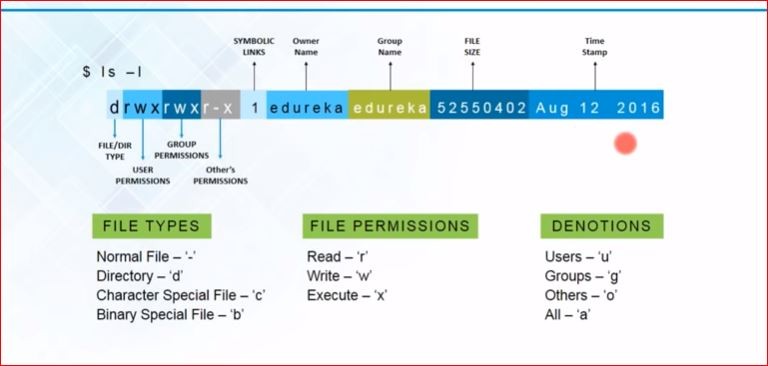 every column of
ls -l, labelled
Those last two types are worth a pause: your terminal (/dev/pts/0) and your disk (/dev/sda) appear in ls -l like any other file. Linux represents devices as files — remember that, it’s about to matter.
(And the permission triplets read as user/group/others; chmod, chown, chgrp change them — chmod u+x script.sh, chmod 770 dir/. Enough for today.)
Processes in one breath
A process is a running instance of a program — every command you type starts one, several instances of the same program can run at once, and each gets a PID and remembers its parent’s (PPID):
1
2
3
$ pstree -p $$
bash(265821)─┬─head(265837)
             └─pstree(265836)
ps -ef lists them all; top shows them live. The kernel also exposes every process as — of course — files, in /proc:
1
2
3
4
/proc/265821/        one directory per PID
├── cmdline          what started it
├── status           state, memory, PPID
└── fd/              ← the door to the next section
Reading top’s columns, since they confuse everyone once: PID and USER you know; PR/NI priority and niceness; VIRT virtual memory, RES the part actually in RAM, SHR shared; S state; %CPU, %MEM, TIME+ total CPU used; COMMAND. Or, as one picture from my notes:
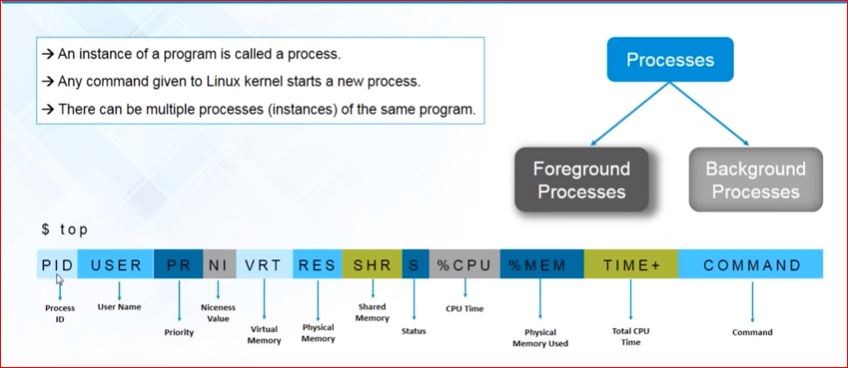 the
top header, column by column
File descriptors
When a process opens a file, the kernel notes it in a small per-process table and hands back the entry’s index — a plain integer called a file descriptor. Every slot points at an opened resource, and thanks to “everything is a file”, that resource can be a real file, a terminal, a pipe, a socket or a device.
This whiteboard sketch from my notes says it all — the per-process table (fdtab) holding pointers to resources, slots 0/1/2 pre-wired, and a freshly creat()-ed file landing in slot 3:
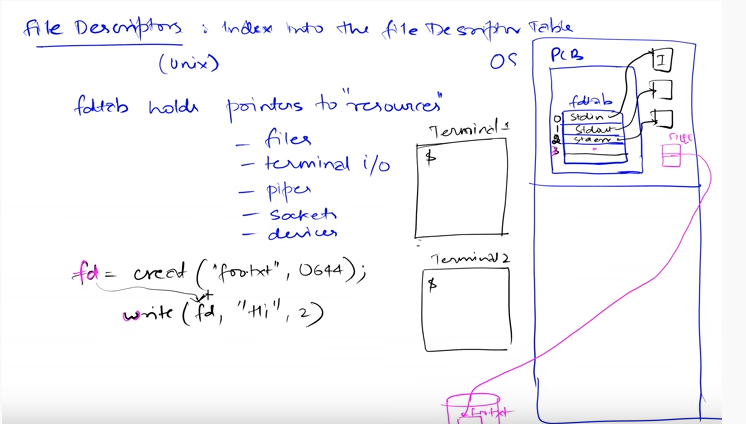 the whole idea on one whiteboard
Three slots exist before your program opens anything:
1
2
3
fd 0   stdin    where input comes from
fd 1   stdout   where normal output goes
fd 2   stderr   where errors go
Don’t take my word — the table is visible in /proc ($$ is the shell’s own PID):
1
2
3
4
$ ls -l /proc/$$/fd
0 -> /dev/pts/28        # keyboard — a terminal, which is a device file
1 -> /dev/pts/28        # screen
2 -> /dev/pts/28        # errors, also the screen
Open something and you simply get the next free number:
>>> f = open("notes.txt", "w")
>>> f.fileno()
3
>>> g = open("notes.txt")       # same file again — new slot anyway
>>> g.fileno()
4
And here’s a bonus that makes shell syntax click forever: redirection is just rewiring this table. command > out.log points fd 1 at a file instead of the terminal; 2>&1 means “make fd 2 point wherever fd 1 currently points”. It was fd arithmetic all along.
One more thing — the fd points at the inode, not at the name. You can feel where this is going.
The mystery, solved
Let’s reproduce the on-call story in miniature. A Python process writes ~100 MB to huge.log and keeps running; then we delete the file:
1
2
3
4
5
$ du -h huge.log
96M     huge.log
$ rm huge.log
$ ls huge.log
ls: cannot access 'huge.log': No such file or directory
Gone? Ask the process:
1
2
$ ls -l /proc/266123/fd
3 -> /scratch/fdlab/huge.log (deleted)
There it is. rm removed the name, but the process’s fd 3 still holds the inode, so the kernel cannot reclaim the blocks. In my run, df reported the ~95 MB back only after the process was killed. An open fd keeps a file alive exactly like a hard link does — the inode’s true reference count includes both names and open descriptors.
This is why “we deleted the logs but the disk is still full” ends with someone restarting the service — and why that restart “magically” works. To find such ghosts: lsof | grep deleted.
Logrotate: the grown-up fix
So how do you trim a log that a process holds open 24/7? You don’t rm it — you use logrotate, which exists precisely because of everything above. It’s not a daemon; cron runs it once a day:
1
2
$ ls /etc/cron.daily/
apt-compat  dpkg  logrotate  man-db  ...
Global defaults live in /etc/logrotate.conf; each service drops its own policy into /etc/logrotate.d/. A real-world one, annotated:
1
2
3
4
5
6
7
8
9
10
11
/var/log/myapp/*.log {
    daily               # rotate every day
    rotate 30           # keep 30 old ones, delete beyond that
    maxage 365          # ...and nothing older than a year
    compress            # gzip rotated logs
    delaycompress       # but not the newest one (someone may still read it)
    dateext             # name them myapp.log-20260908 instead of .1 .2 .3
    notifempty          # skip empty logs
    missingok           # no error if the log vanished
    copytruncate        # ← the fd-aware part, see below
}
That last directive is our whole story in one word. Rotating by renaming would hit the mystery again — the process’s fd follows the inode, so it would keep writing into the renamed file forever. Two honest ways out:
copytruncate— copy the content to the rotated file, then truncate the original in place. Same inode, same fd, the process never notices. (Tiny window where lines written mid-copy are lost.)- rename +
postrotatesignal — rename, then tell the process to reopen its log (e.g.kill -USR1, if the app supports it). No loss, needs cooperation.
Test a policy without waiting for cron — -d is a dry run, -f forces a real one:
1
2
3
4
$ logrotate -d -s state myapp.rotate     # tells you what it *would* do
$ logrotate -f -s state myapp.rotate
$ ls app.log*
app.log  app.log.1                       # rotated, and app.log is back to 0 bytes
Summary
- A name is a directory entry pointing at an inode; the inode owns the metadata and data.
rmonly unlinks names. - Hard link = second name, same inode (that’s the count in
ls -l). Symlink = its own tiny file holding a path; dangles when the path dies. - A process is a running program instance; the kernel publishes each one under
/proc/PID/. - A file descriptor is an index into the process’s table of open resources — files, terminals, pipes, sockets.
0/1/2= stdin/stdout/stderr, and2>&1is just table rewiring. - An open fd holds the inode alive: deleting a busy log frees nothing until the holder closes it (
/proc/PID/fdshows(deleted),lsof | grep deletedfinds them). - logrotate (via
/etc/cron.daily, configs in/etc/logrotate.d/) rotates logs properly —copytruncatekeeps the same inode so the writer never notices.